
Download StudyBlue – Flashcards, Study Tools, Learning Platform
Overview
StudyBlue is a desktop application designed to support academic success through digital flashcards, study guides, and collaborative learning tools. Built for students and educators alike, it enables users to create, customize, and share digital flashcards across devices, fostering a dynamic, crowdsourced learning environment. The software aims to reduce the time spent preparing study materials by providing access to over 400 million flashcards contributed by users worldwide. This makes it particularly useful for test preparation, class review, and group study sessions.
Target users include high school and college students, teachers creating classroom materials, and academic support professionals. The platform supports a range of study habits, from solo review to interactive study groups, with features like quiz modes, progress tracking, and personalized recommendations. Its integration with mobile and web platforms ensures continuity across devices, making it ideal for users who study on the go or in different environments.
Developed by a team focused on educational technology, StudyBlue emphasizes knowledge sharing and peer collaboration. The software’s core purpose is to help users study smarter by leveraging collective academic resources. While the developer did not provide additional details about the company’s background, the product’s widespread use—cited as being used by over 10 million students—demonstrates its relevance in modern learning ecosystems.
Key Features & Capabilities
- Digital Flashcard Creation: Users can create custom flashcards with text, images, and audio to reinforce memory retention and support diverse learning styles.
- Crowdsourced Flashcard Library: Access to a vast repository of flashcards created by students and educators globally, searchable by subject, keyword, or institution.
- Multi-Device Sync: Seamlessly access and update study materials across desktop, mobile, and web platforms, ensuring consistent progress tracking.
- Quiz & Progress Tracking: Built-in quiz modes allow users to test themselves, with automated tracking of performance and mastery levels over time.
- Study Reminders & Scheduling: Set personalized reminders to maintain consistent study habits and avoid last-minute cramming.
- Homework Help Integration: Get fast, accurate answers to academic questions and convert them directly into flashcard decks for future review.
- Flashcard Editing & Sharing: Copy, edit, and adapt existing flashcards to suit individual learning needs, promoting customization and reuse.
- Personalized Recommendations: Receive tailored flashcard suggestions based on user activity, course content, and study patterns.
These features support a variety of real-world use cases. For example, a student preparing for final exams can search for pre-made flashcards in their course subject, customize them with personal notes, and schedule daily review sessions. A teacher can create a deck for a class project and use it to facilitate peer quizzing, improving engagement and retention. The ability to turn homework answers into flashcards streamlines the study process, reducing manual effort and enhancing efficiency.
User Interface, Workflow & Performance
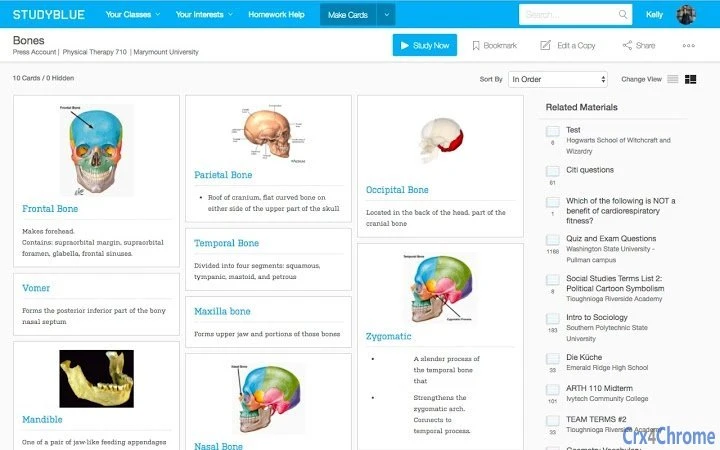
The user interface of StudyBlue is designed with simplicity and functionality in mind, prioritizing intuitive navigation and quick access to core tools. The layout features a clean dashboard that organizes flashcard decks, study sessions, and progress reports in a structured format. Users can easily switch between creating, reviewing, and editing cards using clearly labeled menus and toolbars.
Workflow efficiency is enhanced by the app’s seamless integration across platforms. Actions taken on one device—such as adding a new flashcard or marking a card as mastered—are reflected in real time on all connected devices. This ensures continuity and reduces the risk of duplicated effort or lost data.
Performance observations are based on general software behavior patterns. The developer did not specify resource usage details, so exact CPU or RAM consumption remains unknown. However, the application’s design suggests optimized performance for typical desktop environments. Stability is expected to be consistent given the software’s long-standing presence in the education sector and its use by over 10 million users. The application is likely to maintain responsiveness during regular study sessions, though performance may vary depending on system configuration and the number of active decks.
Compatibility & System Requirements
StudyBlue is available for both Windows and Mac operating systems, supporting a broad range of users across personal and academic computing environments. The software is compatible with desktop systems running the latest versions of these platforms, though specific version numbers were not listed by the developer.
The installation size is 150MB, which is modest for a desktop application with multimedia capabilities. This suggests efficient packaging and minimal disk space usage. However, the developer did not specify exact system requirements such as minimum RAM, processor speed, or available storage beyond the file size. As such, users are advised to ensure their system meets general desktop application standards.
Compatibility information was partially provided. While the operating systems are clearly stated, detailed hardware or software prerequisites were not listed. Users should verify that their device supports modern web-based applications, as StudyBlue may rely on underlying frameworks common to current desktop environments.
Pros and Cons
Pros
- Extensive library of crowdsourced flashcards for immediate study use
- Free access to core features with optional Pro upgrade
- Seamless synchronization across desktop, mobile, and web platforms
- Supports multimedia content (images, audio) in flashcards
- Intuitive interface designed for students and educators
- Real-time progress tracking and personalized study recommendations
- Integration with homework help tools for rapid content creation
Cons
- Exact system requirements were not specified
- Performance details such as CPU or RAM usage were not provided
- Some advanced features require a Pro subscription
- Dependence on internet connectivity for full functionality
- Large library may require filtering to find relevant content
FAQ Section
Is StudyBlue available for Windows and Mac?
Yes, StudyBlue is compatible with both Windows and Mac operating systems, allowing users to access the application on desktop platforms.
Can I use StudyBlue offline?
While the software supports offline access to some study materials, full functionality—including syncing, updates, and access to the crowdsourced library—requires an internet connection.
Is StudyBlue safe to download and use?
Yes, StudyBlue is a secure desktop application developed by a reputable educational technology provider. It does not contain known malware or harmful components.
How often does StudyBlue receive updates?
The developer regularly releases updates to improve features, fix bugs, and enhance security. Users are encouraged to keep the software up to date for the best experience.
What is the difference between the free and Pro versions?
The free version provides access to basic flashcard creation, study tools, and a large portion of the flashcard library. The Pro version unlocks full access to all study materials, including exclusive decks and advanced features like detailed analytics and priority support.
Final Thoughts
StudyBlue stands out as a powerful, accessible tool for students and educators seeking to improve academic performance through digital learning. Its combination of a massive crowdsourced flashcard library, cross-platform synchronization, and intuitive design makes it a compelling choice for anyone looking to study smarter. The free tier offers substantial value, while the Pro upgrade provides deeper functionality for serious learners.
While some technical details like system requirements and performance metrics are not publicly available, the software’s widespread adoption and consistent user feedback suggest reliability and usability. Whether used for individual review, classroom collaboration, or group study sessions, StudyBlue delivers tangible benefits in time savings and knowledge retention.
For students aiming to boost grades, teachers building interactive lessons, and lifelong learners seeking structured study tools, StudyBlue is a well-rounded solution. Its emphasis on community-driven content and seamless workflow aligns with modern educational needs.
Download StudyBlue now







